General Information
General info about the company, products and services
General Information
- Can I monetize the examples I publish to showcase your products?
- SWAM Solo Woodwinds v3 main features improvements
- SWAM Solo Strings v3 main features improvements
- Enabling Applications to Communicate Over the Local Network on macOS (12, 13, 14, 15, 26)
- Enabling Applications to Communicate Over the Local Network on iOS (15, 16, 17, 18, 26)
- Enabling Applications to Communicate Over the Local Network on Windows 11
- I don’t remember my password, can I reset it?
- What is "Ambiente" and Why Should I Use It?
- Why Do SWAM Instruments Need to Use the Local Network?
- What Are SWAM Templates?
- Why Is It Called the SWAM Ecosystem Now?
- What Is the Purpose of Having Multiple Rooms in the Ambiente Room Simulator?
- Backward Compatibility with Previous Versions: Legacy Reverb Mode Explained
- Why Aren’t SWAM Solo Instruments v3.8.0 and SWAM String Sections v1.2.0 Available for iOS?
- Transition Information for New Room Simulator Ambiente
- Who is the owner of the SWAM technology?
- What's the difference between SWAM Saxophones and The Sax Brothers?
- Where do I find User Manuals?
- Getting Started with Ambiente - An Overview
- Understanding the Different Room Types in Ambiente
- Navigating the Interface - Room, Tech, and List Views
- Using the Main Menu and Room Type Selector
- Does Ambiente Use Convolution or Impulse Responses (IR)?
- The Story Behind Ambiente - From String Sections to Standalone Powerhouse
- Are you planning to create any Ensembles like Strings Ensembles and Brass Ensembles in the near future?
- Where can I find the instruction manual for Camelot Pro? Is there a PDF version?
- What’s next for Audio Modeling? Are you planning new updates? How will I know?
- Audio Modeling Core Assistant
- What are the differences between Variflute and SWAM Flutes? / Does SWAM VariFlute replace SWAM Flute?
- What is UniMIDI Hub?
- Who is UniMIDI Hub for?
- SWAM Saxophones vs The Sax Brothers
Audio Modeling Core Assistant
This article provides a clear set of checks and solutions to help you diagnose and resolve potential errors related to the Audio Modeling Core Assistant.
If the Core Assistant cannot operate correctly, it is usually due to issues with the background service that manages licensing and system communication.
Use the following sections to identify the root cause on your operating system.
Communication Error – Possible Causes
A communication error may occur when the background service (the Core Assistant) required by the Audio Modeling Software Center:
• is not installed correctly,
• is not running,
• is blocked by system processes, permissions, firewall, or third-party security tools.
Proceed with the OS-specific steps below to verify and restore proper functionality.
WINDOWS
To ensure the Audio Modeling Software Center operates correctly, verify that its background service (the Core Assistant) is installed and running.
1- Open Services (services.msc).
2 - Locate Audio Modeling Core Assistant in the list.
3 - Confirm that the service status is “Running”.
If not, attempt to start it manually and check whether it remains active.
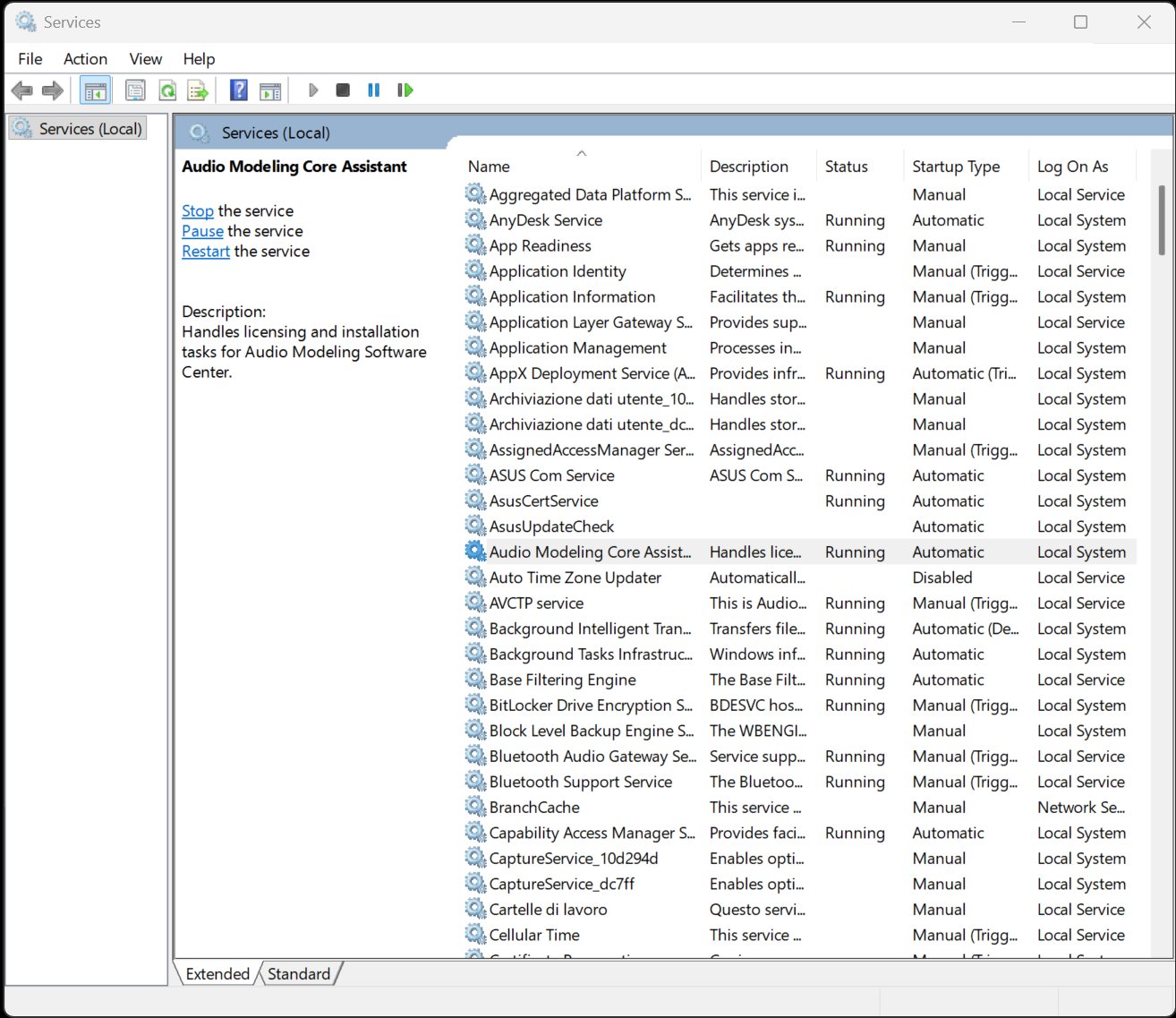
If the service is missing or cannot be started, proceed with a clean reinstall of the Audio Modeling Software Center.
macOS
On macOS, the background process is managed through Login Items.
1 - Go to System Settings → General → Login Items & Extensions.
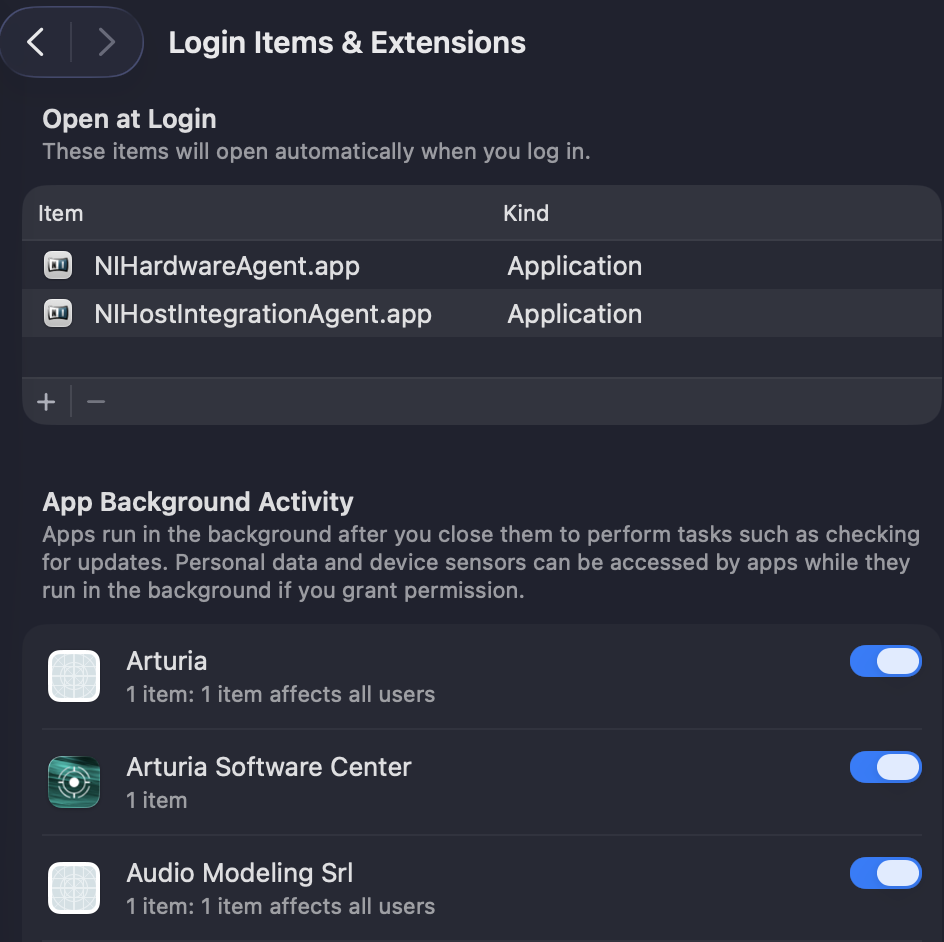
2 - Ensure that Audio Modeling Srl appears in the list of background items and is enabled.
If it is blocked or disabled, re-enable it and restart the Audio Modeling Software Center.
If the item does not appear or remains blocked, perform a clean reinstall of the Audio Modeling Software Center and re-check this section.
If the issue persists or you need further technical clarification, reach out to our support team with all relevant system details.
Other articles in this category
- Can I monetize the examples I publish to showcase your products?
- SWAM Solo Woodwinds v3 main features improvements
- SWAM Solo Strings v3 main features improvements
- Enabling Applications to Communicate Over the Local Network on macOS (12, 13, 14, 15, 26)
- Enabling Applications to Communicate Over the Local Network on iOS (15, 16, 17, 18, 26)
- Enabling Applications to Communicate Over the Local Network on Windows 11
- I don’t remember my password, can I reset it?
- What is "Ambiente" and Why Should I Use It?
- Why Do SWAM Instruments Need to Use the Local Network?
- What Are SWAM Templates?
- Why Is It Called the SWAM Ecosystem Now?
- What Is the Purpose of Having Multiple Rooms in the Ambiente Room Simulator?
- Backward Compatibility with Previous Versions: Legacy Reverb Mode Explained
- Why Aren’t SWAM Solo Instruments v3.8.0 and SWAM String Sections v1.2.0 Available for iOS?
- Transition Information for New Room Simulator Ambiente
- Who is the owner of the SWAM technology?
- What's the difference between SWAM Saxophones and The Sax Brothers?
- Where do I find User Manuals?
- Getting Started with Ambiente - An Overview
- Understanding the Different Room Types in Ambiente
- Navigating the Interface - Room, Tech, and List Views
- Using the Main Menu and Room Type Selector
- Does Ambiente Use Convolution or Impulse Responses (IR)?
- The Story Behind Ambiente - From String Sections to Standalone Powerhouse
- Are you planning to create any Ensembles like Strings Ensembles and Brass Ensembles in the near future?
- Where can I find the instruction manual for Camelot Pro? Is there a PDF version?
- What’s next for Audio Modeling? Are you planning new updates? How will I know?
- What are the differences between Variflute and SWAM Flutes? / Does SWAM VariFlute replace SWAM Flute?
- What is UniMIDI Hub?
- Who is UniMIDI Hub for?
- SWAM Saxophones vs The Sax Brothers