You have the right to **export your personal data** and even **delete any personal data** we store on our systems. You can manage this process independently from the **Account → Privacy & Safety** section in our Customer Portal at this link: [https://my.audiomodeling.com/account/privacy-and-safety](https://my.audiomodeling.com/account/privacy-and-safety).
Steps to Delete Your Account
1. Log into the Customer Portal: Use your credentials to access [https://my.audiomodeling.com/account/privacy-and-safety](https://my.audiomodeling.com/account/privacy-and-safety).
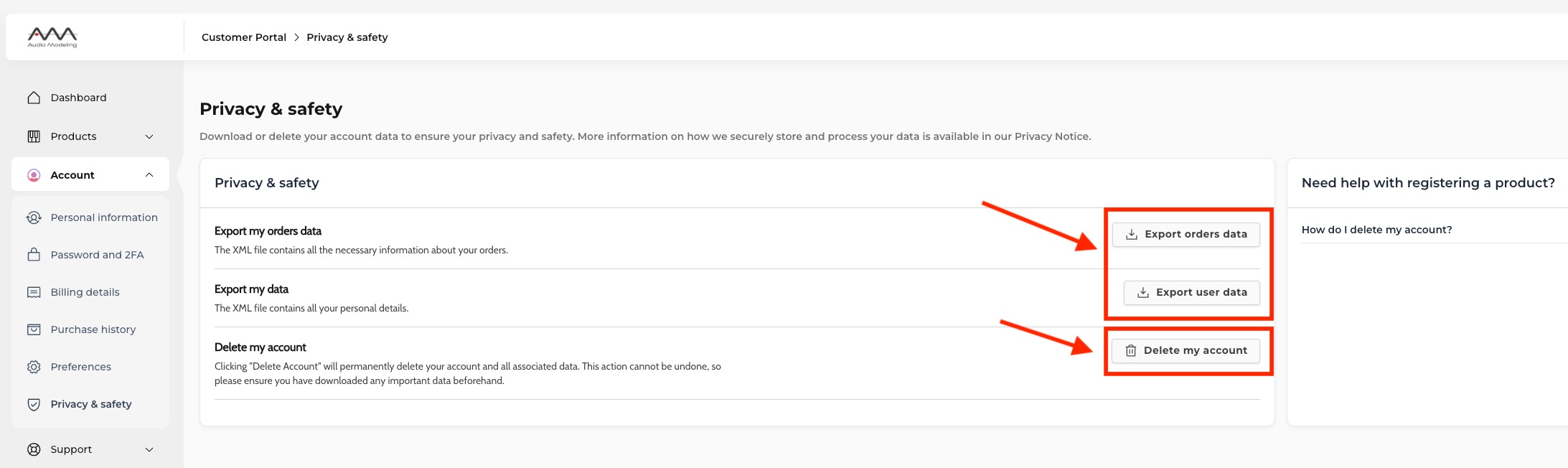
2. Navigate to the Privacy & Safety Section: Click on the: "Privacy & Safety" tab from the Account menu.
3. Locate the Delete Account Option: Scroll to the section titled "Delete My Account".
4. Initiate the Deletion Process:
- Press the "Delete My Account" button as shown in the image.
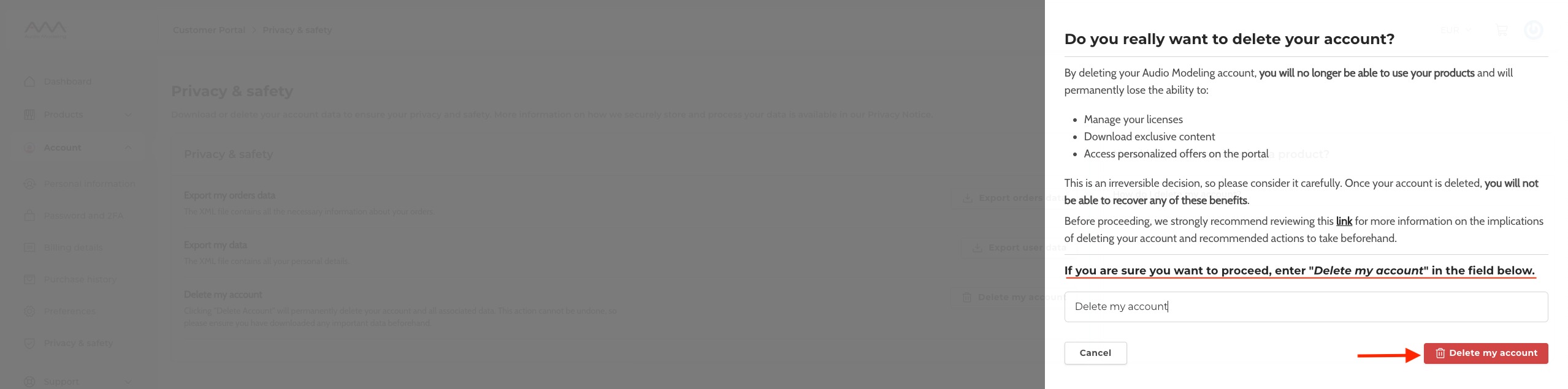
5. Confirm Deletion:
- In the confirmation dialog, type "delete my account" into the text field to verify your decision.
- Finally, press "Confirm" to permanently delete your account.
Important Information Before You Proceed
By confirming the deletion of your account, you will permanently remove your account data from Audio Modeling’s systems. This action is irreversible and entails the following:
- You will no longer be able to use your products.
- You will permanently lose the ability to:
- Manage your licenses.
- Download exclusive content.
- Access personalized offers and other portal features.
Please consider this decision carefully, as once your account is deleted, these benefits cannot be recovered.
Product-Specific Details
- SWAM Solo Strings v2 and SWAM Solo Woodwinds v2: You will still be able to authorize these products using their license keys. However, an active user account is required to:
- Access the latest product updates.
- Manage or deauthorize your licenses.
- SWAM v3 Instruments and Camelot Pro: These products can only be activated with a valid user account. Without an account, you will no longer be able to authorize or use them.
We strongly recommend ensuring you have downloaded and backed up any necessary files, licenses, or data before proceeding with the deletion.
Was this article helpful?
That’s Great!
Thank you for your feedback
Sorry! We couldn't be helpful
Thank you for your feedback
Feedback sent
We appreciate your effort and will try to fix the article